VScode Plugin Reports Error, but g++ Compiles Perfectly? Analyzing the Cause of API Call Errors

Note
This page uses AI technology for translation. The content is for reference only.
A while ago, I wrote a small application and wanted to add a read/write configuration function. Having only learned C++ for a few days, I searched online for a long time and found two Windows APIs: GetPrivateProfileString for reading INI files and WritePrivateProfileString for writing them. Following online tutorials, I wrote these three lines:
    LPTSTR lpPath = new char[MAX_PATH];
    strcpy(lpPath, ".\\config.ini");
    ::WritePrivateProfileString("config", "t", "120", lpPath);
Right after writing, the plugin in VScode instantly flagged it in red and gave the following error:
 But I was sure I followed the tutorial exactly. So where was the problem?
I tried to compile it, and the result was surprising: g++ compiled successfully without any errors and created config.ini in the current directory, writing the specified content.

This was strange. Time to check the official documentation.
I went to MSDN and searched for WritePrivateProfileString but couldn’t find it. I only found WritePrivateProfileStringA and WritePrivateProfileStringW (both have an extra letter at the end).
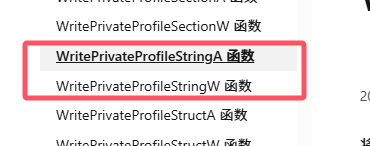
No choice, I clicked on one to check. I chose WritePrivateProfileStringA. Hmm, the parameter types seemed wrong. The tutorial used LPTSTR, but here it specified LPCSTR.
Scrolling down, below the Example section, I saw a note:
The winbase.h header defines WritePrivateProfileString as an alias which automatically selects the ANSI or Unicode version of this function based on the definition of the UNICODE preprocessor constant. Mixing usage of the encoding-neutral alias with code that is not encoding-neutral can lead to mismatches that result in compilation or runtime errors. For more information, see Conventions for Function Prototypes.
This means WritePrivateProfileString is not the API’s real name; it’s selected conditionally.
Back in VScode, I held Ctrl and clicked on WritePrivateProfileString to see the content in Windows.h:
#ifdef UNICODE
#define WritePrivateProfileString  WritePrivateProfileStringW
#else
#define WritePrivateProfileString  WritePrivateProfileStringA
#endif
VScode showed that the upper condition was active, proving that the UNICODE macro was defined in VScode’s environment.
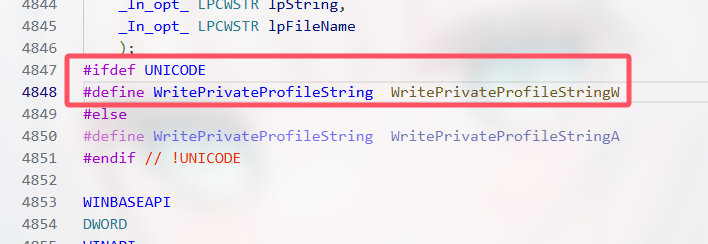
Mystery solved! Because VScode had the UNICODE macro defined while g++ did not, the plugin checked the code against WritePrivateProfileStringW, expecting Unicode and a path stored in wchar_t (wide characters). When g++ compiled, it used WritePrivateProfileStringA, expecting ANSI and a path stored in char (regular characters). Thus, our code using char worked fine under g++ but failed the VScode plugin’s check.
Therefore, our code was correct, but the plugin flagged it as an error due to the different environment. The solution is to explicitly specify that we want to use the WritePrivateProfileStringA function:
    char* lpPath = new char[MAX_PATH];
    strcpy(lpPath, ".\\config.ini");
    ::WritePrivateProfileStringA("LiMing", "Sex", "Man", lpPath);
    delete[] lpPath;
And that’s it. The annoying warning finally disappeared.
Appendix: Specific meanings of LPxxxSTR data types
Core Base Types:
CHAR: Represents an ANSI (8-bit) character (char).WCHAR: Represents a wide character (Unicode, typically 16-bit UTF-16) (wchar_t).TCHAR: An adaptive character type. Compiles toCHARorWCHARbased on project settings (whether the_UNICODEmacro is defined). Used for writing code that can be compiled for either ANSI or Unicode.
String Pointer Types:
LPSTR: Long Pointer to STRing. Points to a null-terminated ANSI string (CHAR*).typedef CHAR* LPSTR;
LPWSTR: Long Pointer to Wide STRing. Points to a null-terminated Unicode (UTF-16) string (WCHAR*).typedef WCHAR* LPWSTR;
LPTSTR: Long Pointer to TCHAR STRing. Points to a null-terminated adaptive character (TCHAR*) string. Depending on the_UNICODEmacro definition, it compiles to eitherLPSTR(ANSI) orLPWSTR(Unicode).typedef TCHAR* LPTSTR;
Constant String Pointer Types:
LPCSTR: Long Pointer to Constant STRing. Points to a null-terminated constant ANSI string (const CHAR*).typedef const CHAR* LPCSTR;
LPCWSTR: Long Pointer to Constant Wide STRing. Points to a null-terminated constant Unicode (UTF-16) string (const WCHAR*).typedef const WCHAR* LPCWSTR;
LPCTSTR: Long Pointer to Constant TCHAR STRing. Points to a null-terminated constant adaptive character (const TCHAR*) string. Depending on the_UNICODEmacro definition, it compiles to eitherLPCSTR(ANSI) orLPCWSTR(Unicode).typedef const TCHAR* LPCTSTR;
Key Differences Summary Table:
| Type | Character Width | Const-ness | Base Type Equiv (ANSI Build) | Base Type Equiv (Unicode Build) | Description |
|---|---|---|---|---|---|
| LPSTR | ANSI (8-bit) | Non-const | char* | char* | Pointer to ANSI string |
| LPCSTR | ANSI (8-bit) | const | const char* | const char* | Pointer to read-only ANSI string |
| LPWSTR | Unicode (16-bit) | Non-const | wchar_t* | wchar_t* | Pointer to Unicode (UTF-16) string |
| LPCWSTR | Unicode (16-bit) | const | const wchar_t* | const wchar_t* | Pointer to read-only Unicode (UTF-16) string |
| LPTSTR | Adaptive | Non-const | char* (LPSTR) | wchar_t* (LPWSTR) | Pointer to adaptive string (TCHAR*) |
| LPCTSTR | Adaptive | const | const char* (LPCSTR) | const wchar_t* (LPCWSTR) | Pointer to read-only adaptive string (const TCHAR*) |
Important Notes:
LPPrefix: “Long Pointer” is a historical artifact. In modern 32/64-bit systems, all pointers are “long.” You can simply think ofLPas “Pointer to.”CSuffix: Meansconst. The content pointed to is read-only; the string cannot be modified through this pointer.TInfix: Means the type isTCHAR, which adapts based on the project’s character set settings. This is for writing code that supports both ANSI and Unicode builds.WSuffix: Means “Wide,” i.e., Unicode (UTF-16).STRSuffix: Means “String” (a NULL-terminated character array).- Modern Windows Development Practice:
- It is highly recommended to always use Unicode builds (set “Character Set” to “Use Unicode Character Set” in Visual Studio project properties). This defines the
_UNICODEmacro. - In Unicode builds:
TCHAR=WCHARLPTSTR=LPWSTRLPCTSTR=LPCWSTR
- Directly using
LPCWSTR/LPWSTRor their aliases likestd::wstring(in C++) is often clearer and avoids the ambiguity of theTCHARfamily, unless you explicitly need to maintain legacy codebases that support both ANSI/Unicode. - ANSI (
LPSTR/LPCSTR) API functions often internally convert the string to Unicode and call the corresponding Unicode version, incurring performance overhead and potential character set conversion issues. Prefer using the explicit Unicode (W) version APIs.
- It is highly recommended to always use Unicode builds (set “Character Set” to “Use Unicode Character Set” in Visual Studio project properties). This defines the
- Compatibility: The
TCHARfamily exists mainly for compatibility with old Windows 9x systems (which primarily used ANSI) and modern NT systems (native Unicode). Modern development (Windows 2000 and later) should prefer Unicode.
Simple Mnemonic:
- See
W-> Unicode. - See
C->const(cannot modify string content). - See
T-> Adaptive, changes to ANSI or Unicode based on project settings. - No
Wand noT-> ANSI. - No
C-> String content can be modified (non-constant). - Has
C-> String content is read-only (constant).
Usage Advice:
- New projects: Always enable Unicode build (
_UNICODEdefined). Prefer usingLPCWSTR(input parameters) andLPWSTR(output parameters), or in C++, useconst wchar_t*andstd::wstring. - Maintaining old projects/needing ANSI compatibility: Use
LPCTSTR(input) andLPTSTR(output) or the correspondingTCHARbase types, and ensure correct handling of the_UNICODEmacro definition. - When interacting with Windows API, note that API functions usually have A (ANSI) and W (Wide/Unicode) versions (e.g.,
MessageBoxAandMessageBoxW). Using the generic macroMessageBoxautomatically selects the correct version based on_UNICODE. The passed string pointer types must also match (LPCSTRfor A version,LPCWSTRfor W version,LPCTSTRfor the generic macro).